The Short Answer
Web development is the work of building and maintaining websites; the US Bureau of Labor Statistics sums up the job as “create and maintain websites”. It has two sides. The front end is the part that runs in the visitor's browser, written in HTML, CSS and JavaScript. The back end is the code on the server, which checks submitted data, stores and retrieves it, and decides what the browser receives.
Front End: What Visitors See and Use
Everything a visitor sees and clicks is front end. Mozilla's MDN Web Docs describe the three languages involved: HTML “specifies webpage structure”, CSS “controls how webpages look in the browser”, and JavaScript is used “most often for dynamic client-side scripts on webpages”, for example to change content on the page or to fetch new data from a server.
MDN sums up the job of this client-side code as “improving the appearance and behavior of a rendered web page”, which includes “selecting and styling UI components, creating layouts, navigation, form validation”. The US Bureau of Labor Statistics adds that front-end developers “integrate graphics, applications (such as a retail checkout tool), and other content”.
Example: an enquiry form and a booking calendar
On the website of Batherm Haustechnik, a plumbing and heating business in Wetzlar, the enquiry form asks visitors to pick the service they need from a list, from bathroom renovation to an urgent emergency call-out. The form, its fields and that list are front-end work; what happens after the visitor sends it is a job for the back end. The same site lets visitors book the free consultation in an embedded Calendly calendar: a service from another provider that the front end places into the page.
Example: a tile configurator
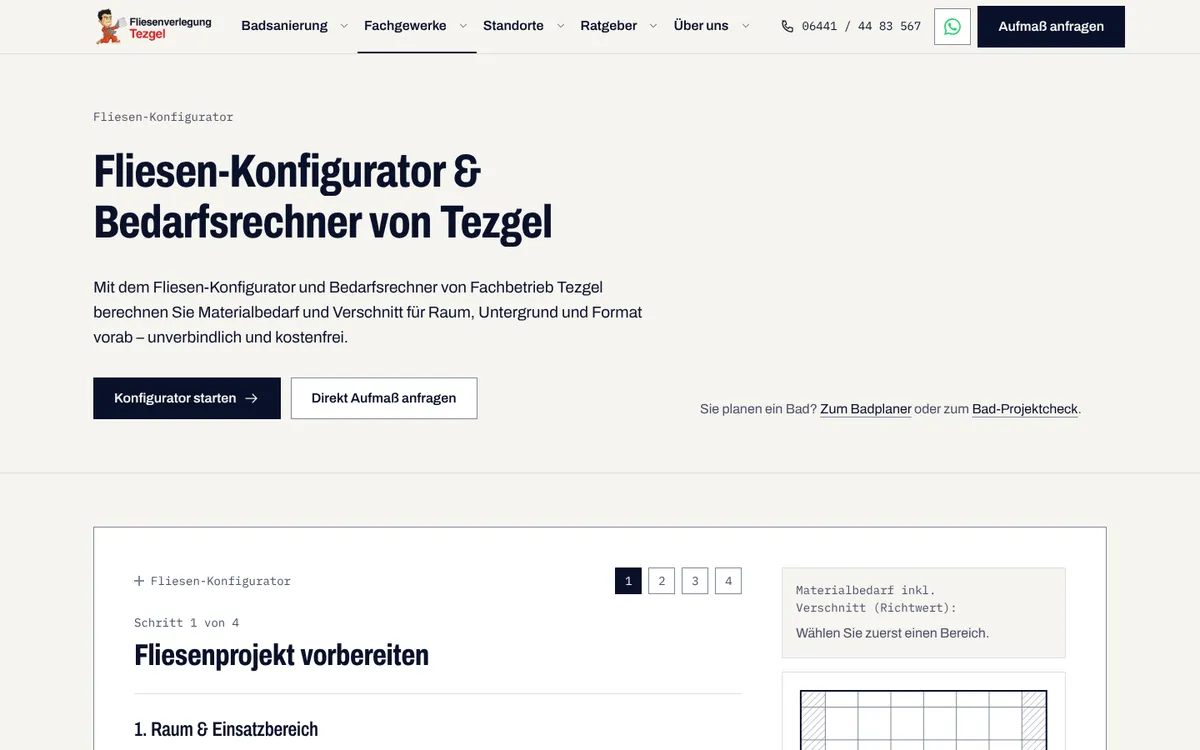
Fliesenverlegung Tezgel, a tiling business, has a tile configurator on its website. In four steps, visitors choose the room, the substrate and the tile format and enter the area; they then see a summary with a guide value for the material needed, including offcuts, and send it by WhatsApp or e-mail. According to the page, the request is not stored on the website. Coday wrote the configurator as custom code, and the step-by-step interface visitors work through is front-end development.
Back End: Content, Data and Server
The back end is the part visitors never see. MDN explains the exchange: when you click a link, submit a form or run a search, “an HTTP request is sent from your browser to the target server”, and the server replies with a response, for example a new HTML page.
Writing the code that runs on the server is called server-side programming, “or sometimes back-end scripting”, in MDN's words. It handles “validating submitted data and requests, using databases to store and retrieve data and sending the correct data to the client as required.” Unlike the front end, it is not tied to the languages of the browser: MDN names PHP, Python, Ruby, C# and JavaScript (Node.js) as popular examples.
Not every page has to be assembled on request. MDN distinguishes a static site, which returns “the same hard-coded content” whenever a resource is requested, from a dynamic site, where pages are “normally created by inserting data from a database into placeholders in HTML templates”.
Where the content lives is a back-end decision as well. A content management system (CMS) is “software that allows users to publish, organize, change, or remove various kinds of content”, as MDN defines it. A headless CMS keeps the content apart from the website: in the words of Sanity's guide to headless CMS, “It separates information and presentation”, and it provides the content “via APIs for developers to query and build applications with”. An API, in MDN's definition, is a set of features and rules that lets software interact with a program, “as opposed to a human user interface”.
Example: enquiries on codayweb.de
On codayweb.de, enquiries and bookings for the first call are handled on the back end. As the About page lists, the e-mails are sent through Resend and the data is stored in Supabase.
Front end
- Runs in the visitor's browser
- Written in HTML, CSS and JavaScript
- Layout, styling, navigation and form checks
- Example: the enquiry form on batherm.de
Back end
- Runs on the server
- Many languages, such as PHP, Python, Ruby, C# or JavaScript (Node.js)
- Validates data, stores and retrieves it, sends the response
- Example: e-mails and data of enquiries on codayweb.de
Frameworks and Tools: Next.js, React and Tailwind
MDN notes that “developers typically write their code using web frameworks”: collections of functions, objects, rules and other code “designed to solve common problems, speed up development” and simplify the tasks of a particular domain. Four names come up in this guide.
React is, in the words of the Next.js Learn course, “a JavaScript library for building interactive user interfaces”. Interfaces are built from components, individual pieces such as a thumbnail or a like button, which are combined into screens, pages and apps.
Next.js is “a React framework for building full-stack web applications”. The difference: React provides functions to build the interface but leaves it to the developer where to use them, while Next.js “handles the tooling and configuration needed for React, and provides additional structure, features, and optimizations”. MDN points to Next.js for rendering React pages on the server.
Tailwind CSS is “a utility-first CSS framework”: styles are written as small classes such as flex or text-center directly in the markup. Vite is “a build tool” for modern web projects, made of a development server and a build command that bundles the code for production.
Which tools Coday uses
codayweb.de runs on Next.js 15, React 19 and Tailwind CSS 4, as its About page lists. The websites of Batherm and of Talia Boutique, a fashion boutique in Wetzlar, also use Next.js with Tailwind CSS. Memo BauT, a garden and landscaping business in Aßlar, shows that it does not have to be Next.js: its website is a React app built with Vite and Tailwind. Coday's web development page puts it this way: “Client projects use the ones they need.”
A framework is not always necessary. For the browser side, MDN notes that writing the code by hand “can be quicker and more efficient if you only need a small, simple website UI”. Instead of a framework, a site can also be built with a content management system; MDN names WordPress, Joomla and Drupal as popular examples.
Web Development and Web Design: Where One Ends and the Other Begins
The US Bureau of Labor Statistics covers both in one occupational profile but describes them separately: web developers “create and maintain websites”, while digital designers “develop, create, and test website or interface layout, functions, and navigation for usability.”
Put simply, design decides how a page is laid out and how visitors find their way; development builds it in code and keeps it working. The two meet in the front end: according to the same source, front-end developers “develop the site’s layout”.
At Coday, both lie with the same person: Coday designs the website and programs it too, with one contact from the first drafts to the finished code.
What is custom web design?
What web design covers, how a custom website differs from a template and when each makes sense.
Where to Look Up the Terms
Web development has its own vocabulary. Coday's glossary explains web development terms, from API Routes and Headless CMS to Next.js, Server-Side Rendering and Static Site Generation, each with a short definition.
If you want to learn web development yourself, Mozilla's MDN offers Learn web development, “a structured set of tutorials” whose Getting started modules are written for “complete beginners”.
Glossary of web development terms
Short definitions of web development terms, listed from A to Z on one page.
Having a Website Developed: What Coday Does
Coday is a one-person business in Wetzlar, Germany. Owner Umutcan Emre Tezgel programs websites and web applications himself, using Next.js, React and TypeScript, and connects a headless CMS such as Sanity where clients want to edit content themselves. After a free first call, you receive a quote with a binding fixed price, and you receive the source code when the project is completed.
Batherm, Talia Boutique, Memo BauT and Fliesenverlegung Tezgel, the examples in this guide, are on the Work page of this website, each with a description of what was built.
Custom web development with Next.js
Websites, online shops and web apps, programmed by the owner, with the tools and examples behind them.
Book a free first call about your website
Pick a date and talk to owner Umutcan Emre Tezgel, by phone or online.
Frequently Asked Questions
What does a web developer do?
A web developer builds and maintains websites. The US Bureau of Labor Statistics distinguishes back-end developers, who are “responsible for the overall technical construction of the website”, from front-end developers, who “create the technical features for a website’s look”. Webmasters “maintain and update websites”.
What is the difference between front end and back end?
The front end runs in the visitor's browser and is written in HTML, CSS and JavaScript; it covers layout, styling, navigation and form checks. The back end runs on the server: it validates submitted data, stores and retrieves it in databases and sends the right data to the browser.
Is web development the same as web design?
No, but they overlap. Design decides layout, functions and navigation so that a site is easy to use; development builds it in code and keeps it working. Front-end development is where the two meet.
Which languages are used in web development?
In the browser, HTML gives a page its structure, CSS its look and JavaScript its behaviour. On the server, many languages are possible; MDN names PHP, Python, Ruby, C# and JavaScript (Node.js) as popular examples.
Do you need a framework to build a website?
Not always. For the browser side, MDN notes that writing the code by hand “can be quicker and more efficient if you only need a small, simple website UI”. For the server side of a web app, MDN says you would “almost never” do without one.
Sources
All sources were retrieved on 21 October 2026.
- U.S. Bureau of Labor Statistics, Occupational Outlook Handbook: Web Developers and Digital Designers (opens in a new tab)
- MDN Web Docs, Introduction to the server side (opens in a new tab)
- MDN Web Docs, How the web works (opens in a new tab)
- MDN Web Docs, Glossary: HTML (opens in a new tab)
- MDN Web Docs, Glossary: CSS (opens in a new tab)
- MDN Web Docs, Glossary: JavaScript (opens in a new tab)
- MDN Web Docs, Glossary: CMS (opens in a new tab)
- MDN Web Docs, Glossary: API (opens in a new tab)
- MDN Web Docs, Introduction to client-side frameworks (opens in a new tab)
- MDN Web Docs, Learn web development (opens in a new tab)
- React, react.dev (opens in a new tab)
- Next.js Docs, Introduction (opens in a new tab)
- Next.js Learn, React Foundations: About React and Next.js (opens in a new tab)
- Tailwind CSS, tailwindcss.com (opens in a new tab)
- Vite, Getting Started (opens in a new tab)
- Sanity, Headless CMS Explained (opens in a new tab)
- Websites named as examples: batherm.de/kontakt (opens in a new tab), batherm.de/beratung (opens in a new tab), tezgel.de/fliesen/konfigurator (opens in a new tab), memobaut.de (opens in a new tab), talia-boutique.de (opens in a new tab)
- Coday's own pages: https://www.codayweb.de/en/about, https://www.codayweb.de/en/services/web-development, https://www.codayweb.de/en/services/web-design