The Short Answer
PHP 8.2 receives security updates from the PHP project only until 31 December 2026 [1] [2]. A website on PHP 8.2 has three ways forward: an update to PHP 8.3, 8.4 or 8.5, which receive security updates for longer [1]; paid extended support (Extended Support) that some hosting providers offer, which buys time but does not replace an update [3] [4] [5]; or a rebuild without PHP. As a first step, check which PHP version your website runs on and ask your hosting provider what it plans for your package after 31 December 2026.
Until When PHP 8.2 and the Other Branches Get Security Updates
The PHP project maintains each branch, such as PHP 8.2 with all versions 8.2.x, first with bug fixes and then, for a while, with security updates only [1]. For PHP 8.2, active support with bug fixes ended on 31 December 2024; security updates continue until 31 December 2026 [1]. After that day the PHP project provides no more security updates for PHP 8.2 [2] [6].
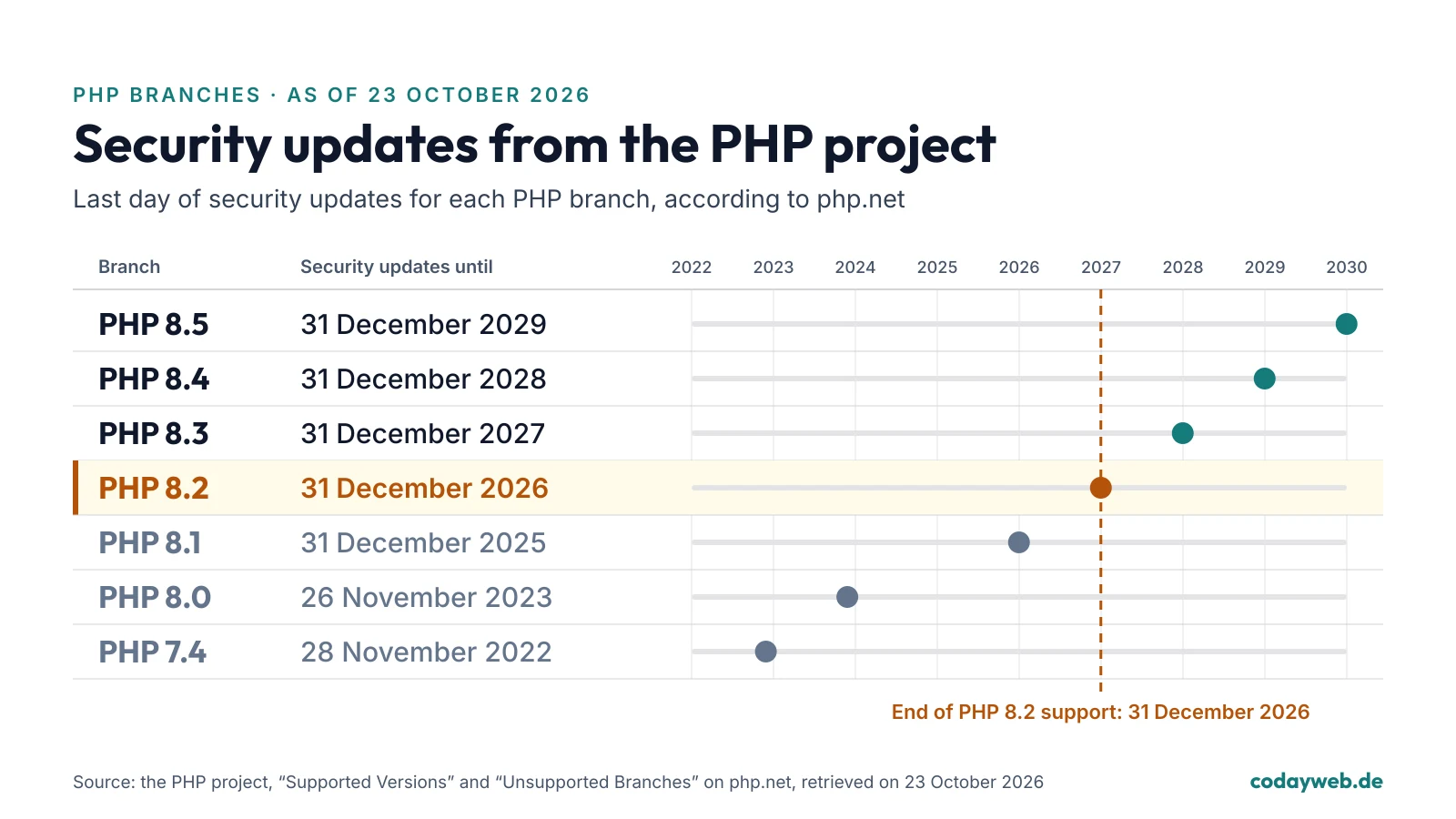
Security updates from the PHP project for each branch, according to php.net (as of 23 October 2026) [1] [6]:
- PHP 8.5: until 31 December 2029
- PHP 8.4: until 31 December 2028
- PHP 8.3: until 31 December 2027
- PHP 8.2: until 31 December 2026
- PHP 8.1: until 31 December 2025
- PHP 8.0: until 26 November 2023
- PHP 7.4: until 28 November 2022
Branches older than PHP 7.4 receive no security updates either [6].
Why the Date Matters
What a branch without security updates means became clear on 21 October 2026. That day the PHP project released emergency updates for two critical security flaws that became known as “PHP2Shell” [7]. Fixed releases came out only for the branches with security support: PHP 8.5.12, 8.4.27, 8.3.36 and 8.2.35 [7]. PHP 8.1 and older no longer receive official updates from the PHP project; for 7.4, 8.0 and 8.1 the security team only published fixes to the source code, not new releases [7].
Security firms have observed attack attempts [8] [9]. As of 22 October 2026, the BSI knew of no successful attacks on a broad scale [10]. In its security notice on PHP, “Kritische Schwachstellen bedrohen Webanwendungen weltweit” (version 1.2 of 22 October 2026), the German Federal Office for Information Security (BSI) writes that all PHP versions before 8.2 have already reached their end of life and that PHP 8.2, too, is supported with security updates only until the end of 2026 [11].
If a flaw in PHP becomes known after 31 December 2026, the PHP project no longer releases a new version of PHP 8.2 for it [2]. Fixes for PHP 8.2 can then only come from others, for example in packages of Linux distributions or in a hosting provider’s Extended Support [7] [3] [4] [5].
How Many WordPress Sites Run PHP 8.2 or Older
About 58% of WordPress websites ran on PHP 8.2 or older on 23 October 2026, and about 35% on versions for which the PHP project no longer provides security updates [12] [6]. WordPress itself recommends PHP 8.3 or newer [13].
The PHP version does not change when you update WordPress, plugins or the theme: PHP runs on the server, and the hosting provider or whoever runs the server sets the version a website uses. For the flaws of October 2026, the BSI therefore said that updating the application was not enough; the PHP version on the server had to be updated [11] [14].
What Hosting Providers Do With PHP 8.2 After 31 December 2026
What happens to PHP 8.2 on your package is up to your hosting provider. Some move sites to a newer version; others charge a monthly fee for extended support of older versions, usually called Extended Support. The overview gives what four German hosting providers say on their own pages, each with the day it was retrieved. It is neither complete nor a rating.
- Host Europe (Classic Hosting): domains on PHP 8.2 switched to PHP 8.4 on 9 November 2026 according to Host Europe; switching back possible only until PHP 8.2 is finally shut down on 7 December 2026; no paid continued operation mentioned on the page (as of 23 October 2026) [15]
- IONOS: PHP Extended Support for PHP 8.1 at €7.81 a month including VAT according to the IONOS price page; no price stated for PHP 8.2 (as of 23 October 2026) [3]
- mittwald: PHP Extended Support for PHP 8.1 and older at €5 in phase 1 (security updates and bug fixes) or €15 in phase 2 (the version stays available, mittwald no longer commits to updates), each per PHP version, project and month plus VAT according to mittwald; charged automatically when an outdated PHP version is in use; PHP 8.2 not named explicitly on the page (as of 23 October 2026) [4]
- STRATO: PHP Extended Support paid according to STRATO, no amount stated on the page; for newer versions it starts, according to STRATO, close to the end of support by the PHP community; STRATO recommends at least PHP 8.4 (as of 23 October 2026) [5]
For the flaws of 21 October 2026, IONOS, STRATO, Hetzner and netcup reported on 21 and 22 October 2026 that they had applied the updates on their web hosting systems [16] [17] [18] [19]. That covers the systems the providers run themselves; on a server of your own, such as a VPS or a root server, you or your administrator apply updates yourselves [16] [17] [19].
Ask your hosting provider what it plans for your package after 31 December 2026 and whether that comes with a cost.
How to Find Your Website’s PHP Version
- In WordPress: under Tools > Site Health; the PHP version is listed on the Info tab in the Server section.
- At your hosting provider: in the customer area, in the settings of your package or domain.
- From outside: Coday’s free instant check fetches your home page once and shows whether it reveals a PHP version publicly.
Many sites reveal no version, and a visible number is not a finding: flaws are also fixed in packages into which a Linux distribution or a long-term support vendor has applied the fixes, and then the number alone says little [7]. Your hosting provider knows which state your package runs on.
Check your PHP version from outside
The free instant check fetches your home page once and shows which PHP version it reveals publicly, if it reveals one.
Three Ways Forward After the End of Support
A website on PHP 8.2 has three ways forward. Which one fits depends on how well the theme and plugins are maintained, whether the site is due for renewal anyway and what your hosting provider offers.
Option 1: Update to PHP 8.3, 8.4 or 8.5
The usual way is an update to a branch that receives security updates for longer: PHP 8.3 until 31 December 2027, PHP 8.4 until 31 December 2028 and PHP 8.5 until 31 December 2029 [1]. WordPress recommends PHP 8.3 or newer [13], STRATO at least PHP 8.4 [5]. The newer the branch, the longer the update lasts; what matters is that the theme and plugins work with it. How to go about it is covered below in “What Can Go Wrong in a PHP Update”.
Option 2: Extended Support From Your Hosting Provider to Buy Time
Extended Support is a paid extension that some hosting providers offer, for a monthly fee, for versions the PHP project no longer provides security updates for [3] [4] [5]. What individual providers charge is in the overview above. Extended Support buys time but does not replace an update: at mittwald, for example, a first phase with security updates is followed by a second in which mittwald no longer commits to updates [4], and WordPress still recommends PHP 8.3 or newer [13]. So plan the update even if you book Extended Support.
Option 3: Rebuild Without PHP
A rebuild without PHP makes most sense if the website is due for renewal anyway or if the theme and plugins do not work with a current PHP version. The new site is built with Next.js or with plain HTML, CSS and JavaScript without a framework. This also matters for flaws in PHP itself, such as PHP2Shell. A site without PHP code, hosted with a provider that runs no PHP, does not execute the code of these flaws. I remove old PHP installations in the same hosting package during the move. That does not make a website unhackable, because nothing does: Next.js needs updates too: on 3 December 2025 the React team disclosed a critical flaw in React Server Components (CVE-2025-55182) that also hit Next.js [20].
How a rebuild with Coday works is explained on the page about the website relaunch.
What Can Go Wrong in a PHP Update
When the PHP version changes, the code of the theme and plugins stays as it is. If a plugin or the theme is not written for the new version, the site may show error messages, single functions such as a form or the shop may stop working, or the page stays blank. You can check this beforehand without visitors noticing. Where the hosting provider switches the version itself, as Host Europe does in its Classic Hosting [15], the test belongs before the day of the switch.
Before the PHP update
PHP Update, Maintenance or Rebuild With Coday
Coday is a one-person business in Wetzlar, Germany, and I, Umutcan Emre Tezgel, do the work myself. I check which PHP version your site runs on and whether the theme and plugins work with a newer one, coordinate the update with your hosting provider and test it on a copy of the site first. I name the fixed price and the start date after the check, before I start. Your hosting stays with your hosting provider.
If the site should be looked after on an ongoing basis afterwards, I take on the WordPress maintenance: updates for WordPress, plugins and the theme, the PHP version at your hosting provider on a supported release and a backup before every update, at a monthly price after a free check. For a rebuild without PHP, the fixed price is in the quote before the work starts. The offer is for businesses, associations and the self-employed.
PHP security: check your version, PHP update, emergency line
The current situation with sources, the table of PHP branches and what Coday offers, from the PHP update to maintenance and the emergency line.
Talk about your PHP version
A free first call (about 15 minutes) with owner Umutcan Emre Tezgel, by phone or online.
Frequently Asked Questions
Will my website keep running on PHP 8.2 after 31 December 2026?
Technically yes, as long as your hosting provider offers PHP 8.2. But after 31 December 2026 the PHP project no longer provides security updates for PHP 8.2. Some providers move sites to a newer version, Host Europe for example to PHP 8.4 in its Classic Hosting, while others offer extended support for a monthly fee. Ask your hosting provider what it plans for your package.
Which PHP version should I move to?
To a branch that receives security updates for as long as possible and that your theme and plugins work with. WordPress recommends PHP 8.3 or newer. PHP 8.4 receives security updates until 31 December 2028, PHP 8.5 until 31 December 2029. Test the new version on a copy of the website first.
What is PHP Extended Support from a hosting provider?
A paid extension that some hosting providers offer, for a monthly fee, for PHP versions the PHP project no longer provides security updates for. Each provider decides what it costs and when it starts. It buys time for the update but does not replace it.
Can I change the PHP version myself?
On a web hosting package you set the PHP version in the customer area of your hosting provider; on a server of your own, the administrator does it. Make a backup first, bring WordPress, plugins and the theme up to date, and test the new version on a copy of the website before the live site. Updating WordPress alone does not change the PHP version.
Does Coday help with moving to a newer PHP version?
Yes. I check for free which PHP version your website runs on and whether the theme and plugins work with a newer one, coordinate the update with your hosting provider and test it on a copy of the site first. I name the fixed price and the start date after the check, before I start. The offer is for businesses, associations and the self-employed.
Sources
The numbers in square brackets in the text refer to these sources.
- [1] The PHP project, Supported Versions (opens in a new tab) (retrieved on 23 October 2026)
- [2] The PHP project, PHP 8.2.35 Released! (opens in a new tab) (published on 21 October 2026, retrieved on 23 October 2026)
- [3] IONOS, PHP Extended Support (opens in a new tab) (retrieved on 23 October 2026)
- [4] mittwald, PHP Extended Support (opens in a new tab) (retrieved on 23 October 2026)
- [5] STRATO, Was ist der STRATO PHP Extended Support? (opens in a new tab) (retrieved on 23 October 2026)
- [6] The PHP project, Unsupported Branches (opens in a new tab) (retrieved on 23 October 2026)
- [7] The PHP project, Security advisory: Critical remote code execution vulnerabilities, update now (opens in a new tab) (published on 21 October 2026, retrieved on 23 October 2026)
- [8] Cloudflare, Cloudflare deploys protections against php2shell vulnerability (opens in a new tab) (published on 21 October 2026, retrieved on 23 October 2026)
- [9] watchTowr, PHP2Shell FAQ: CVE-2026-109618 & CVE-2026-109619 Fixes (opens in a new tab) (published on 20 October 2026, retrieved on 23 October 2026)
- [10] German Federal Office for Information Security (BSI), Version 1.2: PHP - Kritische Schwachstellen bedrohen Webanwendungen weltweit (opens in a new tab) (published on 22 October 2026, retrieved on 23 October 2026)
- [11] German Federal Office for Information Security (BSI), PHP: Kritische Schwachstellen bedrohen Webanwendungen weltweit (opens in a new tab) (published on 22 October 2026, retrieved on 23 October 2026)
- [12] WordPress.org, PHP version statistics (API stats/php/1.0, as of 23 October 2026) (opens in a new tab) (retrieved on 23 October 2026)
- [13] WordPress.org, Requirements (opens in a new tab) (retrieved on 23 October 2026)
- [14] WordPress Deutschland, Kritisches PHP-Sicherheitsupdate (opens in a new tab) (published on 21 October 2026, retrieved on 23 October 2026)
- [15] Host Europe, Informationen zur Deaktivierung der PHP Version 8.2 (Classic Hosting) (opens in a new tab) (retrieved on 23 October 2026)
- [16] IONOS, PHP-Sicherheitslücke: Websites bei IONOS sind geschützt (opens in a new tab) (published on 22 October 2026, retrieved on 23 October 2026)
- [17] STRATO, PHP-Sicherheitslücken: Websites und Hosting bei STRATO sind geschützt (opens in a new tab) (published on 22 October 2026, retrieved on 23 October 2026)
- [18] Hetzner, PHP Sicherheitslücken CVE-2026-109618 und CVE-2026-109619 (opens in a new tab) (published on 21 October 2026, retrieved on 23 October 2026)
- [19] netcup, Wichtiger Sicherheitshinweis: Unsere Systeme sind vorübergehend nicht erreichbar (opens in a new tab) (published on 21 October 2026, retrieved on 23 October 2026)
- [20] The React team, Critical Security Vulnerability in React Server Components (opens in a new tab) (published on 3 December 2025, retrieved on 23 October 2026)